







Upgrader simulator
18Playhop rating
About game
In CS2 Skin Upgrade Simulator, you'll find an internal economy, inventory system, and market. Use coins to purchase items, pick a skin for upgrading, and choose a costlier target item. The more expensive the target, the slimmer the chance of успех.
The core mechanic is the chance wheel: after starting the upgrade, the pointer will stop on the ring. If it lands within the colored sector, the upgrade is successful and the new item is added to your inventory. If not, the attempt fails and the item goes into recovery.
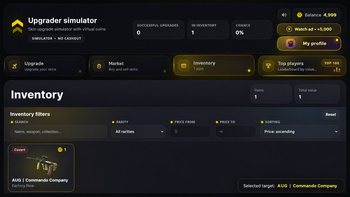
You can buy new skins on the market, search for items in the inventory, filter them by price and rarity, and sort them from least to most expensive or vice versa. Item prices are based on the game's internal database. You can increase your balance by watching rewarded ads.
All progress is saved automatically: balance, inventory, statistics, recovered items, and settings will be preserved after restarting the game.
How to play
Controls — mouse clicks or screen touches. Upgrade process: — go to the upgrades section; — pick a skin from your collection; — find a costlier item for upgrading; — view the success probability; — hit the upgrade button; — if the pointer hits the colored area, you get the new skin; — otherwise, the item needs to be restored. Inventory management: — look through your skins; — apply the search function; — filter items by price and rarity; — organize items by value; — sell unnecessary skins for coins. Marketplace: — select skins from the list; — use filters for minimum and maximum price; — arrange items; — purchase skins with internal currency.Game info
Age rating
6+
Platforms
Authorization support
Yes
Localization
Russian, English
Screen orientation
Release date
Cloud saves
Yes
Categories